We may earn a commission from links on this page.
Key takeaways
- Size the picture from your seat: the screen width should be about half your seating distance, so 10 feet away suits a 100-inch image.
- Work out projector placement from its throw ratio: distance equals throw ratio times image width.
- Keep the bottom of the image about 24 to 30 inches above the floor, and center the lens on the screen instead of leaning on keystone correction.
- Darkness matters more than brightness: block windows and put every glowing object behind or beside the seats, never near the screen.
- Plan a front row of floor cushions and a back row on the sofa so everyone gets a clear sightline.
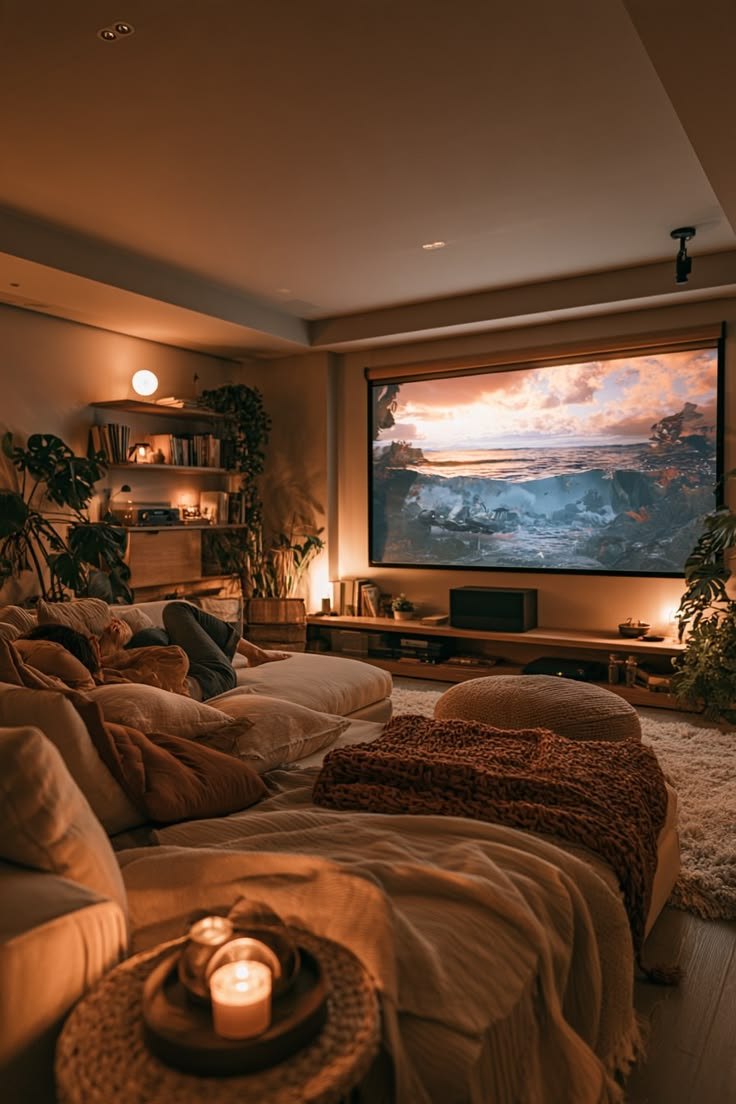
A projector turns a plain living room wall into something that feels like a private cinema: a huge glowing picture, a deep sofa full of beige and cream throws, one candle flickering on a round tray and the rest of the room fading into soft shadow. That is exactly the mood of a basement or living room movie den, and it is easier to achieve than most people expect.
The difference between a projector night that wows and one that disappoints is rarely the projector itself. It comes down to a few measurements, where the light goes and how the seating is arranged. This guide takes you through each step in the order you should do it, with the numbers you need.
Measure first: how big should the picture be?
Start with the seat, not the wall. Measure from where your eyes will be on the sofa to the wall you plan to project on. A comfortable rule is that the picture's width should be roughly half that distance.
- 8 feet away: about 48 inches wide, which is roughly an 80 to 90-inch diagonal.
- 10 feet away: about 60 inches wide, roughly a 100-inch diagonal.
- 12 feet away: about 72 inches wide, roughly a 120-inch diagonal.
For a standard 16:9 picture, a 100-inch diagonal is about 87 inches wide and 49 inches tall, so check that your wall has that much clear, flat space before anything else. Go a little smaller rather than bigger: an image that is too large forces you to turn your head to follow the action and makes any softness in the picture more obvious.
Screen or wall: preparing the surface
A smooth, matte, white or light grey wall works perfectly well for casual movie nights. Texture, glossy paint and strong colors all show through the picture, so if the wall is busy, a pull-down or fold-up screen is worth it. Light grey surfaces help when the room can't be made fully dark, because they keep blacks from looking washed out.
Height matters for comfort. When seated on a typical sofa, the bottom edge of the image should sit about 24 to 30 inches above the floor. That puts the middle of the picture slightly above eye level, which is how cinemas are designed, and it keeps heads in the front row from cutting into the frame.
Clear the wall below the image as well. A console with a lamp or framed photos under the picture will catch spill light and pull your eye away from the film.
Place the projector using its throw ratio
Every projector lists a throw ratio, such as 1.2:1 or 1.5:1. It tells you how far the lens must be from the wall for a given image width:
Projector distance = throw ratio × image width.
For an 87-inch-wide picture with a 1.2:1 projector, that is about 104 inches, or 8 feet 8 inches. With a 1.5:1 model, you would need about 130 inches, or nearly 11 feet. Short-throw models, often around 0.5:1, can sit just a few feet from the wall, which is ideal in small rooms because nobody walks through the beam.
Line the lens up with the horizontal center of the screen. Most living room projectors sit on a shelf or side table behind the sofa or on a coffee table in front of it. Digital keystone correction can square up an angled picture, but it reduces sharpness, so physical alignment is always better. A small tripod or a stack of books gets you surprisingly close.
Control the light: darkness is your best upgrade
Brightness specs are measured in ANSI lumens. As a rough guide, a fully dark room looks great with around 1,000 to 1,500 lumens, while a room with some unavoidable light benefits from 2,000 or more. Whatever your projector, removing light gives you a bigger improvement than buying a brighter one.
- Windows: close curtains or add blackout liners, especially on any window facing the screen wall.
- Light-colored walls and ceilings bounce the projector's own light back onto the image. You can't repaint for one evening, but you can keep bright objects off the walls near the screen.
- Keep mood lights low and behind you. Anything glowing should sit behind or beside the seats and well below the beam.
This is where flameless candles shine, literally. A cluster of flameless LED pillar candles on a side table or the floor beside the sofa gives the den a warm flicker without spilling light on the screen. With a remote, you can dim them all at once when the opening credits roll, and the timer switches them off after four or eight hours if you fall asleep mid-film.

Flameless LED Pillar Candles, set of 3
Real-wax pillars with a gentle flicker, a remote and a 4- or 8-hour timer, so the room stays cozy without any open flame near cushions or throws. Batteries are not included.
$49.99 · Free shipping
Buy Now — $49.99If you want a little sparkle for the pre-show, hang warm white fairy curtain lights on the wall behind the seating. Run them in a slow fade while people find their seats, then switch them to steady and low, or off, once the film starts.

Warm White Fairy Curtain Lights (300 LED)
A 9.8 x 9.8 ft curtain of 300 warm white LEDs on USB power, with a remote and 8 modes. Perfect behind the sofa for a soft pre-show glow.
$45.99 · Free shipping
Buy Now — $45.99Get the sound right
Built-in projector speakers are small and usually sit behind or beside the audience, which makes voices seem to come from the wrong direction. The fix is simple: put the sound near the screen. A soundbar or Bluetooth speaker on a low stool or the floor under the image makes dialogue feel like it comes from the actors.
Two other tips make a big difference. Turn on any dialogue or voice mode so speech stays clear at a comfortable volume, and if the projector has a noisy fan, place it behind the seats so the hum is masked by the film's sound. Test with a quiet, dialogue-heavy scene before the night, not an action sequence.
Arrange the seating like a mini cinema
The cozy movie den look comes from layers: a big sofa at the back and soft seating in front of it. Arranged well, everyone gets a clean view.
- Front row: floor cushions, poufs or a folded duvet about 6 to 8 feet from the screen for kids or anyone who likes to sprawl.
- Back row: the sofa, ideally 9 to 12 feet back, depending on picture size.
- Keep a path: leave about 30 inches clear between rows so nobody steps through the beam on a snack run.
Pile on the textures. A chunky knit throw blanket draped over the sofa arm gives that relaxed, layered look and covers one adult comfortably at 51 by 63 inches. Add a velvet cushion or two for contrast; an emerald velvet pillow cover brings a deep, rich color that looks great in low light.

Chunky Knit Throw Blanket, grey
Soft chenille cable knit in neutral grey that pairs with cream, beige and wood tones and keeps you warm through a long film.
$62.99 · Free shipping
Buy Now — $62.99
Emerald Velvet Pillow Cover 18x18
Deep emerald velvet with pom-pom trim that adds a rich jewel tone to any 18-inch insert.
$21.99 · Free shipping
Buy Now — $21.99Small touches that make it feel special
Once the technical parts are in place, think about what people touch and reach for. Keep drinks off the projector table, since one spill can end the evening. A round acacia wood serving tray on the coffee table gives a single candle or a couple of mugs a safe, stable home, and its warm wood tone matches the den look. At 8.7 inches across, it is a compact tray for one person's essentials rather than a platter for the whole group.

Round Acacia Wood Serving Tray
A compact 8.7-inch round tray in natural acacia that keeps a mug, a candle or a small snack steady on the coffee table or sofa arm.
$47.99 · Free shipping
Buy Now — $47.99Finally, keep feet warm. Basements and ground-floor rooms are often the coldest in the house, and a pair of fluffy plush house slippers for whoever claims the floor cushions is a small luxury everyone appreciates.

Fluffy Plush House Slippers
Faux-fur lined clogs with non-slip soles that keep feet warm on cold floors. Pick your size on the product page.
$25.99 · Free shipping
Choose your size — $25.99Your movie night run-through
- An hour before: set up the projector, focus the image and play a test clip with dialogue.
- Thirty minutes before: close curtains, lay out cushions and throws and set the candles and tray.
- Ten minutes before: switch on the fairy lights, pour drinks and line up the film.
- Showtime: dim the candles, set the fairy lights to steady or off and press play.
Shop the look
Everything used in this setup, in one place. Shipping is free on every item.
- Flameless LED Pillar Candles, set of 3 — $49.99, free shipping Buy Now
- Warm White Fairy Curtain Lights (300 LED) — $45.99, free shipping Buy Now
- Chunky Knit Throw Blanket, grey — $62.99, free shipping Buy Now
- Emerald Velvet Pillow Cover 18x18 — $21.99, free shipping Buy Now
- Round Acacia Wood Serving Tray — $47.99, free shipping Buy Now
- Fluffy Plush House Slippers — $25.99, free shipping Choose size
The missing piece: what will you actually watch?
The picture is sized, the room is dark and the seats are ready. All that's left is the film itself.
Most homes now juggle several apps, each with its own login and its own monthly bill, and a good part of every movie night goes to scrolling, signing in and wondering which service has the film. A simpler route is one device with the streaming already included.
HD Streaming Box + 1 Year of Streaming included — $119, one payment.
One purchase covers the box and a full year of streaming, so there is no separate monthly bill to track for that first year.
- Plug it into HDMI on your TV or projector.
- Connect it to Wi-Fi.
- Press play.
Checklist
- Seating distance measured and image width set to about half of it
- Projector distance worked out from its throw ratio
- Bottom of the image 24 to 30 inches above the floor
- Lens centered on the screen, keystone kept to a minimum
- Windows covered, bright objects moved away from the screen
- Sound placed near the screen, dialogue mode on
- Front row of floor cushions, 30-inch path between rows
- Candles and fairy lights behind or beside the seats
Frequently asked questions
How far should a projector be from the wall?
Multiply the projector's throw ratio by the image width you want. A 1.2:1 projector making an 87-inch-wide picture, about 100 inches diagonal, needs to sit roughly 8 feet 8 inches from the wall.
Can I use a projector in a room with some light?
Yes, but contrast suffers. Close the curtains, keep lamps behind the seats and choose a projector with 2,000 ANSI lumens or more if the room can't be made dark. A light grey screen also helps.
Do I need a screen, or is a wall enough?
A smooth, matte, white or light grey wall works well for casual movie nights. A screen is worth it if the wall is textured, glossy or strongly colored.
What size picture is best for a living room?
Aim for an image width about half your seating distance. At 10 feet from the screen, that means about 60 inches wide, or roughly a 100-inch diagonal.